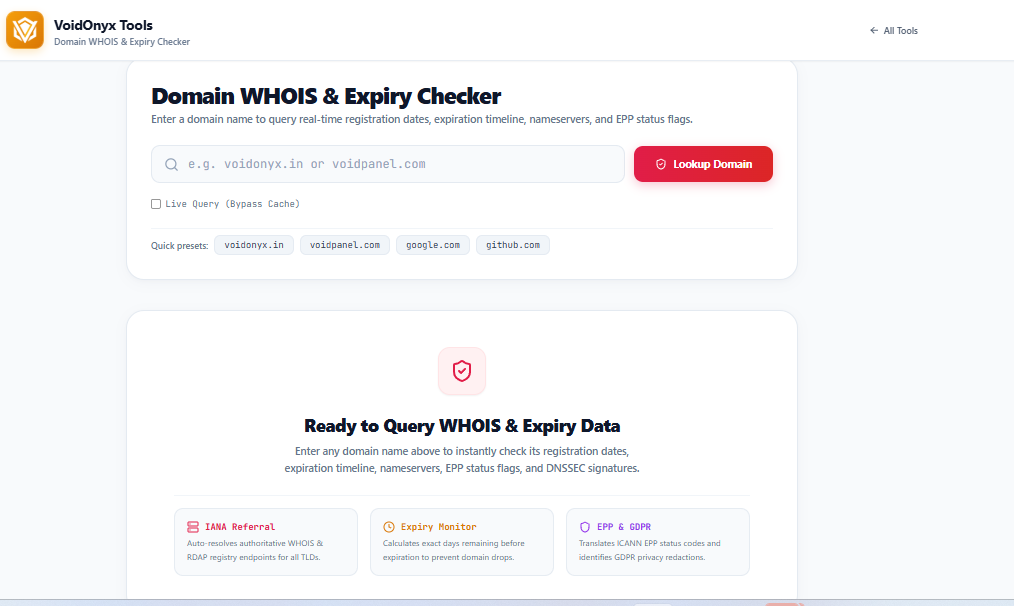
Every domain name on the internet carries a paper trail. Who registered it, when it was created, when it expires, and which servers answer for it — all of this lives in a public record system that predates the modern web. That system is WHOIS, and understanding it is a foundational skill for developers, sysadmins, and webmasters alike. This guide breaks down how WHOIS and its modern successor, RDAP, actually work under the hood, how to query them from the command line, and how to build expiry-tracking and privacy practices into your own workflow.
What Is WHOIS, Really?
WHOIS is a request-response protocol, standardized in RFC 3912, that runs over TCP port 43. It's about as simple as internet protocols get: a client opens a TCP connection to a WHOIS server, sends a single line of text — the query, usually just the domain name — followed by a carriage return and newline, and the server dumps back a plain-text response before closing the connection. There's no authentication, no structured schema, and no guaranteed format. Every registry and registrar can format its output differently, which is the protocol's biggest weakness.
You can talk to a WHOIS server directly with netcat:
bash
echo -e "example.com\r\n" | nc whois.verisign-grs.com 43
Or more conveniently, most Linux and macOS systems ship a whois client that handles server discovery for you:
bash
whois example.com
A typical response includes the registrar name, creation date, expiration date, updated date, name servers, and domain status codes such as clientTransferProhibited, ok, or pendingDelete.
Enter RDAP: WHOIS's Structured Successor
Because WHOIS output isn't machine-parseable in any consistent way, ICANN mandated a replacement: the Registration Data Access Protocol, or RDAP, defined across RFC 7480 through 7484. RDAP runs over HTTPS and returns JSON, making it dramatically easier to parse programmatically. It also supports proper redirection between the central bootstrap registry and the authoritative registrar, something WHOIS never formalized.
You can query RDAP directly with curl:
bash
curl -s https://rdap.org/domain/example.com | jq .
A trimmed JSON response looks like this:
json
{
  "ldhName": "EXAMPLE.COM",
  "status": ["client transfer prohibited"],
  "events": [
    { "eventAction": "registration", "eventDate": "1995-08-14T04:00:00Z" },
    { "eventAction": "expiration", "eventDate": "2026-08-13T04:00:00Z" }
  ],
  "nameservers": [
    { "ldhName": "A.IANA-SERVERS.NET" },
    { "ldhName": "B.IANA-SERVERS.NET" }
  ]
}
Notice the parallel structure to the WHOIS fields: registrar, creation date, expiration date, name servers, and status flags — just serialized cleanly. If you're building any kind of automated tool, such as a domain expiry dashboard, RDAP should be your primary data source, with raw WHOIS as a fallback for the handful of TLDs that haven't fully migrated.
Complementary DNS Diagnostics
WHOIS and RDAP tell you who owns a domain and what its lifecycle status is, but not necessarily what's currently resolving. That's where DNS query tools come in.
To check the authoritative name servers and A records, use dig:
bash
dig example.com NS +short
dig example.com A +short
dig example.com MX +short
To trace the full resolution path from the root down:
bash
dig +trace example.com
To inspect the TLS certificate — useful for verifying domain ownership transitions or expiry-related outages:
bash
openssl s_client -connect example.com:443 -servername example.com </dev/null 2>/dev/null | openssl x509 -noout -dates
And to check open ports on the host, which helps when diagnosing why a WHOIS-listed nameserver isn't responding:
bash
nmap -p 53,80,443 example.com
Together, WHOIS or RDAP, dig, openssl, and nmap form a complete diagnostic toolkit. WHOIS tells you the registration lifecycle, DNS tools tell you what's actually being served, and TLS and port checks confirm the domain is reachable and secure.
Why Expiry Tracking Matters
Domain expiration is one of the most avoidable causes of business-impacting outages. When a domain lapses, it typically enters a grace period, reflected in RDAP as a redemptionPeriod status, during which the original owner can still renew, often at a premium. If it goes unrenewed, it moves to pendingDelete, after which it's released back into the public pool and is sometimes claimed within seconds by automated domain-drop services. Any dependent services break at the same moment: email routing through MX records, SSL certificates tied to the domain, API integrations, and OAuth redirect URIs all go down together.
A domain expiry tracker should poll RDAP, with WHOIS as a fallback, on a regular schedule, compare the expiration event date against the current date, and alert when a domain crosses a configurable threshold such as 30, 14, 7, or 1 day out. Building this as a small scheduled job — a cron task hitting RDAP endpoints and writing results to a database — is usually sufficient. There's rarely a need to poll more than once every 12 to 24 hours, since expiration dates don't change minute to minute.
Domain Privacy: What It Actually Protects
Before GDPR and ICANN's Temporary Specification for gTLD Registration Data, WHOIS records exposed a registrant's name, address, phone number, and email in plaintext to anyone who queried them, making it a goldmine for spammers and harassers. Today, the landscape looks different. Most registrars offer WHOIS privacy or proxy services, which substitute the registrant's real contact details with the registrar's own forwarding address. Many gTLD registries now redact personal data by default for registrants in jurisdictions with data-protection laws, showing only organization-level or redacted fields unless the querier can demonstrate a legitimate interest through RDAP's differentiated access model. Country-code TLDs vary widely: some, particularly across Europe, redact by default, while others still expose full registrant data.
If you're building a WHOIS lookup tool, design for redaction as the norm rather than the exception. Don't assume every response will contain an email or phone number — your interface should gracefully render something like "Redacted for privacy" rather than showing blank or broken fields.
Troubleshooting Guide for Webmasters and Sysadmins
WHOIS lookup times out. Port 43 is frequently blocked by corporate firewalls and some cloud provider egress rules. Test connectivity directly with nc -vz whois.iana.org 43. If this hangs, the issue is network-level, not application-level. Fall back to an RDAP query over HTTPS, which uses port 443 and is far less likely to be blocked.
A domain shows as expired but was already renewed. Registry and registrar systems can take up to 24 to 48 hours to propagate renewal status. Re-query RDAP directly at the registry level, rather than through a caching third-party WHOIS aggregator, to confirm the true state.
Name servers in WHOIS don't match what's actually resolving. This usually indicates a pending NS change that hasn't propagated, or a TTL caching issue at a resolver. Compare the registry's authoritative answer against your local resolver's answer:
bash
dig NS example.com @a.gtld-servers.net +short
dig NS example.com +short
If the two differ, it's a propagation or caching delay, not a WHOIS data problem.
Rate limiting or 429 errors on repeated queries. Both port-43 WHOIS servers and RDAP endpoints throttle aggressive polling. Implement exponential backoff, cache results locally for at least several hours, and, for any production tool, respect the Retry-After header that RDAP servers commonly return.
Building It Into Your Stack
For teams building internal tooling, a minimal viable domain monitor needs three components: an RDAP client with WHOIS fallback, a scheduler such as cron or a lightweight queue, and a diffing and alerting layer that compares expiration timestamps against configurable thresholds. Pair that with the DNS and TLS diagnostic commands covered above, and you have a toolkit that covers not just whether a domain is about to expire, but whether it's actually healthy right now.
Understanding WHOIS and RDAP isn't just trivia — it's operational insurance. A five-minute check with dig and whois can save you from a multi-day outage caused by a lapsed domain nobody was watching.