RBL Checker Tool: How to Detect, Diagnose, and Fix Email Blacklist Listings Instantly
Email deliverability failures rarely announce themselves. There's no dashboard alert when a receiving mail server starts silently dropping your messages — you just notice, days or weeks later, that a customer never got your invoice, or a password-reset email never arrived. Nine times out of ten, the root cause is the same: the sending IP landed on a Real-Time Blackhole List (RBL), also called a DNSBL (DNS-based Blackhole List).
This guide explains how DNSBL lookups actually work under the hood, how to run manual diagnostic checks from the terminal with dig, nslookup, and curl, exactly what to do once you find a listing, and how the VoidOnyX RBL Checker automates the entire 30+ zone scan into a single lookup.
Table of Contents
- What Is an RBL/DNSBL, and How Does the Lookup Work?
- Why Mail Server IPs Get Blacklisted
- Manual Blacklist Checks from the Terminal
- Automating It: The VoidOnyX RBL Checker
- Delisting Steps for Major RBL Providers
- Prevention Checklist: SPF, DKIM, DMARC, and IP Hygiene
- Frequently Asked Questions
1. What Is an RBL/DNSBL, and How Does the Lookup Work?
Show Image
An RBL is a list of IP addresses associated with spam, malware, or abuse, maintained by anti-spam organizations and queried in real time by receiving Mail Transfer Agents (MTAs) — Postfix, Exim, Sendmail, Exchange — mid-handshake, before a message is even accepted.
The mechanism is pure DNS, formalized in RFC 5782 (DNS Blacklists and Whitelists), which means no dedicated API or credentials are needed to check a listing:
Step 1 — Reverse the IP's octets. For 198.51.100.45, the reversed form is 45.100.51.198.
Step 2 — Append the RBL provider's zone. 45.100.51.198.zen.spamhaus.org.
Step 3 — Query the A record. If the query returns nothing, the IP is clean. If it returns an address in the 127.0.0.0/8 range, the IP is listed.
Step 4 — Decode the response. The specific loopback address returned tells you why the IP is listed, not just that it is:
Returned AddressMeaningCommon Provider127.0.0.2Direct spam source / high-volume spammerSpamhaus SBL, SpamCop127.0.0.3Open relay or vulnerable proxySORBS, DroneBL127.0.0.4Infected machine / botnet / malware hostSpamhaus XBL, CBL127.0.0.10–127.0.0.11Dynamic/end-user IP rangeSpamhaus PBL
This is the exact lookup mechanism the VoidOnyX RBL Checker runs — just across every major zone simultaneously instead of one query at a time.
2. Why Mail Server IPs Get Blacklisted
                  ROOT CAUSES OF IP LISTINGS
                            |
     ┌───────────────┬──────┴──────┬────────────────┐
     ▼               ▼             ▼                ▼
 Spam Traps    Compromised    Open Relays /     Missing/Wrong
 & Honeypots   User Accounts  Unauth. Port 25   Reverse DNS (PTR)
- Spam traps and honeypots — a single hit on a purchased or scraped mailing list can trigger an instant listing on SpamCop or SORBS.
- Compromised accounts — credential-stuffed mailboxes get used to relay phishing or spam mail in bulk before anyone notices.
- Open relays and unauthenticated forwarding — an MTA misconfigured to relay mail from arbitrary senders gets found and exploited by spam botnets fast.
- Missing or mismatched Reverse DNS (PTR) — sending from an IP whose PTR record doesn't match the sending hostname trips automated policy lists like Spamhaus PBL.
- Sudden volume spikes on a cold IP — blasting a large batch from a brand-new, unwarmed IP looks identical to botnet behavior to automated reputation systems like Barracuda's BRBL.
- Shared hosting reputation bleed — on shared IP ranges, another tenant's spam can get the entire IP block listed, taking your legitimate mail down with it.
3. Manual Blacklist Checks from the Terminal
Before reaching for an automated tool, every sysadmin should be comfortable running these checks by hand.
DNSBL lookup with dig
bash
dig +short 45.100.51.198.zen.spamhaus.org A
No output → clean. An address in 127.0.0.0/8 → listed.
Same check with nslookup
bash
nslookup -type=A 45.100.51.198.zen.spamhaus.org
Pull the human-readable removal reason via TXT record
bash
dig +short 45.100.51.198.zen.spamhaus.org TXT
Confirm your sending IP and PTR record first
bash
dig +short mail.voidonyx.in A
dig +short -x 203.0.113.45
The reverse lookup (-x) should resolve back to mail.voidonyx.in — a mismatch here is a common, self-inflicted cause of PBL listings.
Check the SMTP banner and STARTTLS support
bash
curl -v telnet://mail.voidpanel.com:25
or, for a raw connection test:
bash
nc -v mail.voidpanel.com 25
Confirm the mail port isn't an open relay
bash
nmap -p 25 --script smtp-open-relay mail.voidonyx.in
Clean output: smtp-open-relay: Server is not an open relay.
4. Automating It: The VoidOnyX RBL Checker
Show Image
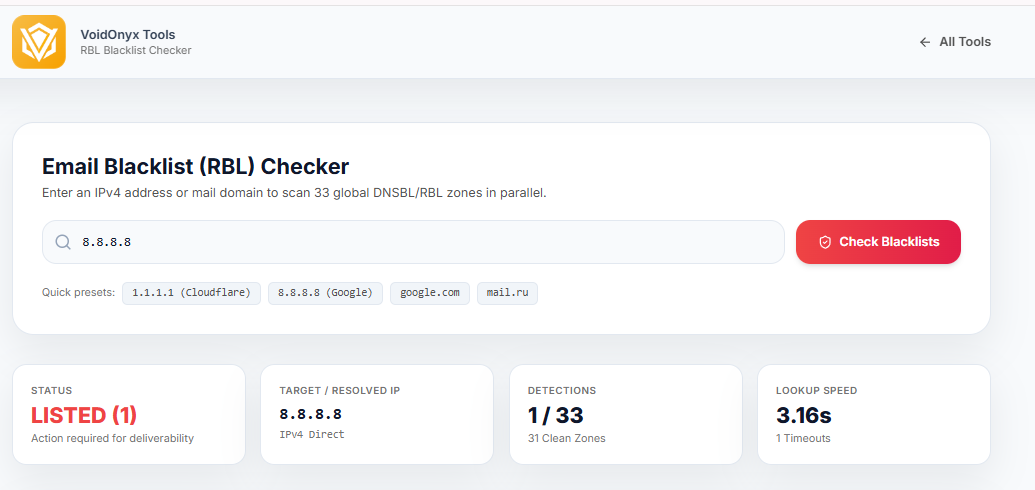
Running the commands above against 30+ RBL zones one at a time works but is slow, and it's easy to skip a zone that actually matters to your recipients' mail infrastructure. The VoidOnyX RBL Checker runs the full scan in the browser — nothing to install, no OS-specific tooling required.
How it's built
- Parallel resolution across 30+ DNSBL zones — queries run simultaneously, so a full scan completes in roughly the time of the slowest single zone, not the sum of all of them.
- Per-zone timeout handling — a slow or unresponsive RBL is shown clearly as "timeout" rather than stalling or breaking the rest of the scan.
- Domain-to-IP resolution — enter either a raw IP or a domain; if it's a domain, the tool resolves the
Arecord first and shows exactly which IP was checked. - Deliverability summary, not just raw listings — SPF, DKIM, and DMARC presence are checked alongside blacklist status, since a clean IP with no authentication configured is still a weak deliverability signal to receiving servers.
- Result caching — repeat lookups on the same IP within a short window are served from cache, both for speed and to avoid hammering RBL zones with redundant queries.
Reading your results
Show Image
- Fully clean across all zones + SPF/DKIM/DMARC present — the target state for a production sending domain.
- One listing on a minor/regional RBL — usually low-impact, often self-resolves within hours.
- Listed on Spamhaus ZEN, SpamCop, or Barracuda specifically — high-impact, since these are checked by a large share of receiving mail infrastructure. Treat as urgent.
5. Delisting Steps for Major RBL Providers
Spamhaus (ZEN / SBL / XBL / PBL)
- Confirm the listing directly on
check.spamhaus.org. - Identify the specific sub-list — SBL means resolve the active spam source and submit removal; XBL means run a malware scan before requesting removal, or you'll likely be re-listed within hours; PBL means use the "suppress PBL listing" option and confirm your PTR record is correct.
Barracuda Reputation Network (BRBL)
- Submit your IP via
barracudacentral.org/rbl/removal-request. - Include an admin contact email and a short note on what was fixed.
- Requests are typically processed within 12–24 hours.
SORBS
- Create an account at
sorbs.netand search for your listed IP. - Open a delisting ticket under the correct category (spam, open relay, HTTP proxy).
- SORBS re-tests automatically before approving removal — fix the underlying issue first.
SpamCop
- Look up your IP at
spamcop.net/bl.shtml. - Listings are dynamic and typically auto-expire within 24–48 hours once new spam reports stop.
- Stopping the underlying spam leak is usually the fastest fix — no manual form needed.
6. Prevention Checklist: SPF, DKIM, DMARC, and IP Hygiene
        AUTHENTICATION & DELIVERABILITY TRIAD
                        |
        ┌───────────────┼───────────────┐
        ▼                ▼                ▼
      SPF              DKIM             DMARC
  Authorizes       Cryptographically   Policy + reporting
  sending IPs      signs message body  on unauthenticated mail
- SPF —
v=spf1 ip4:203.0.113.45 include:_spf.google.com ~all. Verify withdig +short voidonyx.in TXT. - DKIM —
default._domainkey.voidonyx.in TXT "v=DKIM1; k=rsa; p=MIGfMA0G...". Verify withdig +short default._domainkey.voidonyx.in TXT. - DMARC —
_dmarc.voidonyx.in TXT "v=DMARC1; p=reject; rua=mailto:dmarc-reports@voidonyx.in; pct=100". Verify withdig +short _dmarc.voidonyx.in TXT. - PTR/reverse DNS — confirm it matches your sending hostname (
dig +short -x <your-ip>). - Dedicated sending IP — avoids shared-hosting reputation bleed entirely; if that's not an option, monitor the shared IP's status regularly.
- Warm up new IPs gradually — ramp volume over 2–4 weeks on any new sending IP rather than sending full volume on day one.
7. Frequently Asked Questions
How often do RBLs update their data? Continuously in most cases — major providers like Spamhaus and Barracuda process updates every few minutes, not on a daily batch cycle.
Why does a DNSBL return 127.0.0.2 instead of just true/false? Because the whole system is built on ordinary DNS A-record lookups rather than a custom API. Encoding the listing reason into the last octet of a loopback address lets providers convey a specific category within a standard DNS response.
Can a shared hosting IP get my email blocked even if I never sent spam? Yes. If another tenant on the same shared IP sends spam, the entire IP's reputation takes the hit, including your legitimate mail. A dedicated sending IP avoids this.
What's the difference between a hard bounce and a soft bounce? A hard bounce (5xx) is permanent — the address doesn't exist, or the IP is blacklisted outright. A soft bounce (4xx) is temporary — a full mailbox, greylisting, or a transient server issue — and typically resolves on retry.
.
Conclusion
A clean sending IP reputation isn't something you fix once and forget — it's maintained through understanding how DNSBLs actually work, running periodic manual checks, following each provider's specific delisting process when something goes wrong, and keeping SPF, DKIM, and DMARC correctly configured so receiving servers trust your mail in the first place.
For a quick one-off check, a single dig command takes seconds. For ongoing monitoring across 30+ blacklists plus authentication status in one view, the VoidOnyX RBL Checker automates the entire process in-browser — enter an IP or domain and get a clear, actionable picture of your sending reputation, no installation required.
Related reading: DNS Checker Tool: Complete Guide to DNS Propagation & Records — since DNS misconfiguration (missing PTR, broken SPF/DKIM TXT records) is frequently the root cause behind a deliverability issue that looks like a blacklist problem at first glance..